![SC logo dark stacked-1.png]](https://knowledge.spartacommodities.com/hs-fs/hubfs/SC%20logo%20dark%20stacked-1.png?height=40&name=SC%20logo%20dark%20stacked-1.png)
Important updates to Sparta features and functionality
Should you have any questions about this change, please reach out to your customer success representative at success@spartacommodities.com
Location:
New Features
Curves
| Manual 5-day Overwrites |
| LC Delta vs Settle View - Change on day |
| Futures Quotations |
| Time Spreads in Mobile |
| Rolling Front Month in Seasonals |
Knowledge
| Leonidas Market Open Brief |
Intelligence
| Fuel Oil Arbs |
Data Marketplace/API
|
Coming soon - Snapshots before midnight |
New Features
Curves
LC Delta vs Settle View - Change on day
Location: Sparta web platform
What does it do?
The Off Chg button appears on the main toolbar of the Live Curves table page.
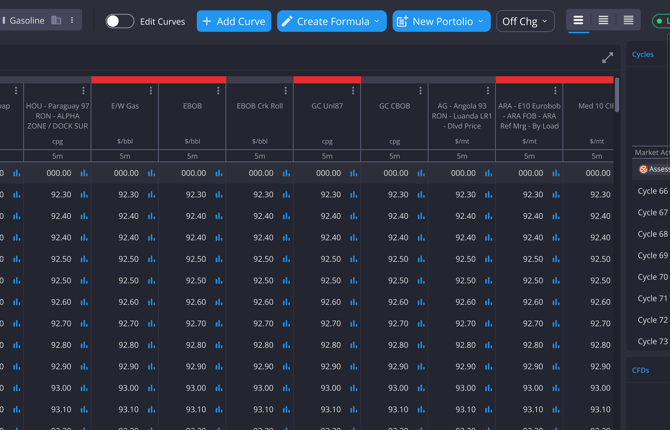
The feature is disabled by default and shows Chg off. Clicking on it will show the following options:
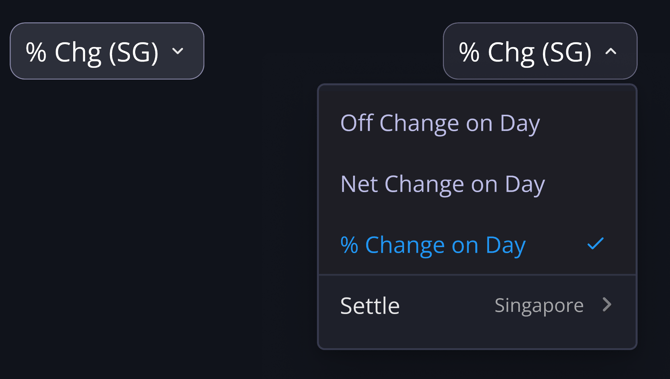
Selecting ‘Net Change on Day’ or ‘% Change on Day’ will enable it to display the change on day data in the table. Once enabled, each row in the table except the GX assessment and the Market Activity will display an additional value beneath the current price showing the change on the day. For that, we will increase the height of those rows.
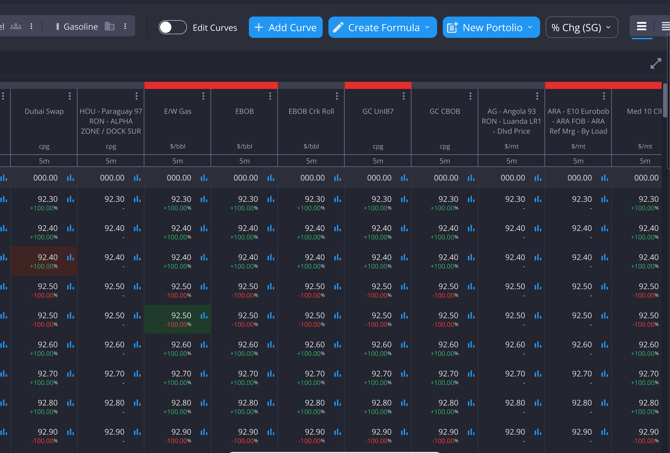
We will follow this colour coding for the Change on Day:
-
green if positive
-
red if negative
-
white if 0
Manual 5 day Overrites
Location: Sparta web platform
You can now manually overwrite individual 5-day window values.
-
Overrides apply only to the selected window(s)
-
Other windows in the month remain unchanged
-
Manual values take precedence over calculated/default values
Futures Quotations
Location: Sparta web platform
This feature expands the capabilities of Live Curves by incorporating more live futures market quotations into the curves environment.
Users can observe futures bid/ask levels, understand market liquidity, and analyse price movements without navigating across different parts of the platform.
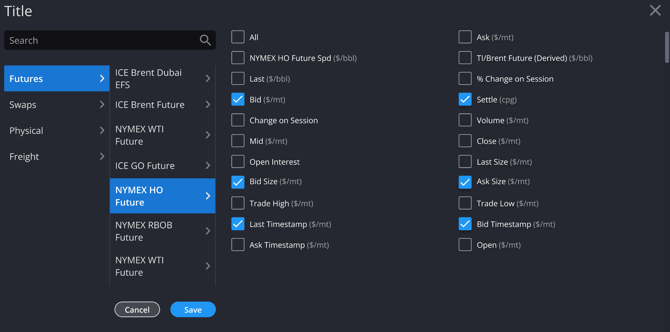
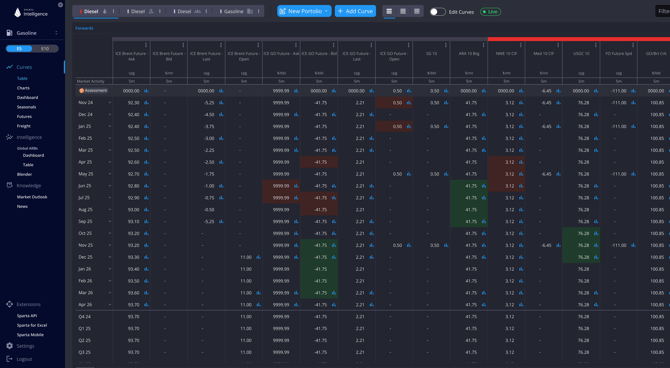
This enhancement also enables more accurate spread construction from outright futures legs, improving how you analyse and monitor relationships between contracts. In addition, making these quotations chartable provides greater visibility into how futures markets evolve over time.
Time Spreads in Mobile
Location: Mobile
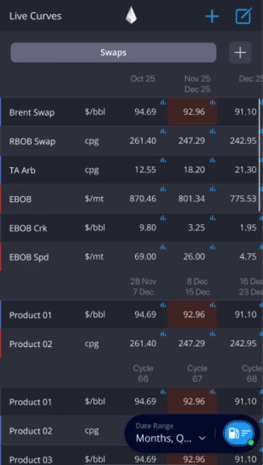
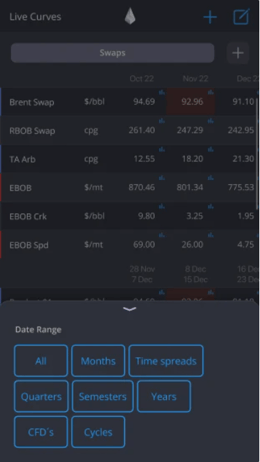
Time spreads are now accessible via mobile in the Live Curves table.
You can hide/show them be selecting/unselecting the option in the menu:
Rolling Front Month in Seasonals
Rolling Front Month to Seasonals extends the existing continuous prompt-month view into the Seasonals section, so users can analyse recurring patterns using the contract that was actually front and most liquid at each point in time.
.png?width=670&height=377&name=staging.sparta.app_gasoline_liveCurves_historicalForwards_productId=OTRBSW%26period=C+01%26years=2026(High%20Res).png)
Knowledge
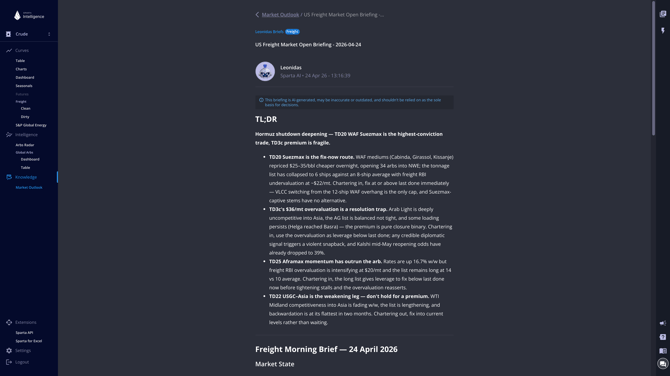
Market Open Brief
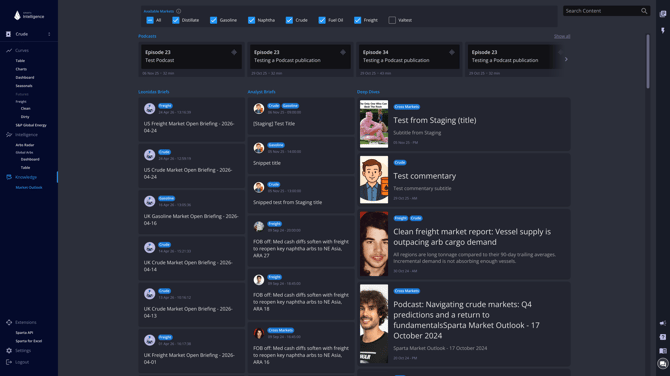
Your daily AI intelligence read, built from Sparta's validated physical market data and delivered straight to your inbox at every market open. Found in the left hand column of the Market Outlook screen.
Intelligence
Fuel Oil Arbs
Fuel Oil Arbs puts the whole map in one view: 125 finished-grade arbs and 250 component arbs, VLSFO and HSFO side by side, each with landed value and margin. If you already use Diesel Arbs, the screen will feel familiar.
Where to find it
Open Sparta Intelligence → Arbs → Fuel Oil. Must have an Intelligence liscence to access.
Two controls sit above every view:
- Finished Grade ↔ Component toggle — switch between the 125 finished-grade arbs and the 250 underlying blending components.
- Low ↔ High Sulphur switch — move between VLSFO and HSFO. Many components feed both segments.
Three ways to read the map
The same arb data is available through three tabs. Pick the one that matches how your desk thinks.
By Destination
Start here when you're sourcing barrels into a hub. Set the destination (for example, Singapore) and the sulphur segment, and the dashboard ranks every origin that can land there by landed value or margin.
![sparta.app_intelligence_fueloil_arbs_dashboard_by_destination_ALGECIRAS_ba228abf-306c-4ce4-9680-260f6289541e_dateRange=[WINDOW]&origins=null&grade=null&vessels=null&pricingBasis=null&routing=null&type=null&sulphurType=LSFO&gra (2)](https://knowledge.spartacommodities.com/hs-fs/hubfs/sparta.app_intelligence_fueloil_arbs_dashboard_by_destination_ALGECIRAS_ba228abf-306c-4ce4-9680-260f6289541e_dateRange=%5BWINDOW%5D%26origins=null%26grade=null%26vessels=null%26pricingBasis=null%26routing=null%26type=null%26sulphurType=LSFO%26gra%20(2).png?width=670&height=377&name=sparta.app_intelligence_fueloil_arbs_dashboard_by_destination_ALGECIRAS_ba228abf-306c-4ce4-9680-260f6289541e_dateRange=%5BWINDOW%5D%26origins=null%26grade=null%26vessels=null%26pricingBasis=null%26routing=null%26type=null%26sulphurType=LSFO%26gra%20(2).png)
By Origin
Flip to By Origin when you're placing barrels out of a hub. Set the origin and see every destination it reaches, ranked the same way.
![sparta.app_intelligence_fueloil_arbs_dashboard_by_destination_SINGAPORE_ba228abf-306c-4ce4-9680-260f6289541e_dateRange=[WINDOW]&origins=[ROTTERDAM]&grade=null&vessels=null&pricingBasis=null&routing=null&type=null&sul (1)](https://knowledge.spartacommodities.com/hs-fs/hubfs/sparta.app_intelligence_fueloil_arbs_dashboard_by_destination_SINGAPORE_ba228abf-306c-4ce4-9680-260f6289541e_dateRange=%5BWINDOW%5D%26origins=%5BROTTERDAM%5D%26grade=null%26vessels=null%26pricingBasis=null%26routing=null%26type=null%26sul%20(1).png?width=624&height=351&name=sparta.app_intelligence_fueloil_arbs_dashboard_by_destination_SINGAPORE_ba228abf-306c-4ce4-9680-260f6289541e_dateRange=%5BWINDOW%5D%26origins=%5BROTTERDAM%5D%26grade=null%26vessels=null%26pricingBasis=null%26routing=null%26type=null%26sul%20(1).png)
By Delivery Date
Use By Delivery Date to see the arb across the forward curve rather than a single prompt print. The matrix lays routes against delivery periods so you can spot where the structure opens and closes through time.
![sparta.app_intelligence_fueloil_arbs_dashboard_by_destination_SINGAPORE_ba228abf-306c-4ce4-9680-260f6289541e_dateRange=[WINDOW]&origins=[ROTTERDAM]&grade=null&vessels=null&pricingBasis=null&routing=null&type=null&sul (2)](https://knowledge.spartacommodities.com/hs-fs/hubfs/sparta.app_intelligence_fueloil_arbs_dashboard_by_destination_SINGAPORE_ba228abf-306c-4ce4-9680-260f6289541e_dateRange=%5BWINDOW%5D%26origins=%5BROTTERDAM%5D%26grade=null%26vessels=null%26pricingBasis=null%26routing=null%26type=null%26sul%20(2).png?width=670&height=377&name=sparta.app_intelligence_fueloil_arbs_dashboard_by_destination_SINGAPORE_ba228abf-306c-4ce4-9680-260f6289541e_dateRange=%5BWINDOW%5D%26origins=%5BROTTERDAM%5D%26grade=null%26vessels=null%26pricingBasis=null%26routing=null%26type=null%26sul%20(2).png)
How to read a single arb
Click any route to open it. Each arb gives you two numbers and the full breakdown behind them:
- Landed value — what it costs to deliver that barrel into the destination hub.
- Margin — the sales price at the destination minus the landed cost. Switch between the two views per arb without leaving the dashboard.
Expand the cost breakdown to see every input — FOB, freight, and the paper spread — laid out line by line. Nothing is hidden, so you can trace any print straight back to the underlying data.
Every arb refreshes as pricing and freight move, so the screen is never stale.
Good to know
- Finished grades vs components. Finished-grade arbs cover tradable VLSFO and HSFO cargoes. Component arbs cover the blending feedstocks that feed them, by landed value.
- History depth. Data that existed before this release carries its full history; the newly added finished-grade landed values, arb margins, and driver breakdowns build history from launch onward.
Data Marketplace
Snapshots before midnight - coming soon!
API data now available same evening, not next morning.
|
Resolves a ~12-hour lag between London market close and EOD snapshot availability via the bulk download |